
Learn how to check Instagram engagement rate using simple formulas, Instagram Insights, free tools, and practical examples to improve your 2026 strategy.
How to Check Instagram Engagement Rate: A Complete Guide for 2026
Having thousands of Instagram followers does not necessarily mean your content is performing well. An account can attract a large audience but receive very few likes, comments, shares, or saves. That is why understanding how to check Instagram engagement rate is important for creators, influencers, marketers, and businesses.
Instagram engagement rate helps you understand how people interact with your content rather than simply counting how many accounts follow you. It provides a clearer picture of whether your posts are interesting, useful, entertaining, or relevant to your audience.
The good news is that you do not need expensive software or advanced marketing knowledge to measure this performance. You can use Instagram Insights, simple mathematical formulas, or third-party analytics tools to calculate your results.
This guide explains the complete process, including different calculation methods, practical examples, free analytics options, common mistakes, and ways to improve your results in 2026.
What Is Instagram Engagement Rate?
Instagram engagement rate is a percentage that measures how actively people interact with your Instagram content compared with a selected audience metric, such as your follower count or content reach.
These interactions can include:
- Likes on posts and Reels.
- Comments from followers and other users.
- Saves when people bookmark content.
- Shares when users send posts to others.
- Story replies and sticker interactions.
For example, imagine that your Instagram account has 5,000 followers. One of your posts receives 250 likes, 30 comments, 40 saves, and 20 shares.
Your total interactions are 340.
However, the number of followers alone does not explain how many people actually saw the post. That is why marketers use different engagement rate formulas to understand performance more accurately.
A higher engagement rate can indicate that your content connects well with its audience. A lower rate may suggest that your content needs improvement, although the result should always be considered alongside reach, audience size, and content type.
Quick definition: Instagram engagement rate measures the percentage of a selected audience or group of viewers that interacts with your content.
Why Should You Check Your Instagram Engagement Rate?
Checking engagement regularly helps you understand whether your social media strategy is producing meaningful results.
Instead of publishing content without knowing how people respond, you can use engagement information to make better decisions.
1. Understand Your Audience
Engagement helps reveal what your audience finds interesting.
For example, if your educational carousels consistently receive more saves than your promotional posts, your followers may prefer content they can revisit later.
This information can help you create more relevant material.
2. Identify Your Best-Performing Content
Not every Instagram post performs equally.
Some Reels may attract thousands of views, while other posts generate more comments and shares despite receiving fewer views.
By checking engagement rate, you can identify which content formats create meaningful interactions.
3. Evaluate Influencer Partnerships
Businesses often review engagement before paying influencers for sponsored promotions.
A creator with 20,000 genuine followers and consistent interaction may be more suitable for a campaign than an account with 100,000 followers but very little audience activity.
Engagement rate is useful for initial evaluation, although audience authenticity, demographics, content quality, and campaign results also matter.
4. Improve Your Content Strategy
Regular analysis can help you discover patterns.
You may find that:
- Educational posts attract more saves.
- Personal stories generate more comments.
- Short tutorials receive more shares.
- Reels reach more non-followers.
These patterns can guide your future publishing decisions.
How to Check Instagram Engagement Rate Using the Formula
The easiest way to calculate engagement rate is to use a simple formula.
There are several versions, but the follower-based method is commonly used when comparing publicly visible Instagram accounts.
Method 1: Engagement Rate by Followers
Use this formula:
Engagement Rate = (Likes + Comments + Saves + Shares) ÷ Followers × 100
For example, consider the following Instagram account:
| Metric | Number |
|---|---|
| Followers | 8,000 |
| Likes | 300 |
| Comments | 45 |
| Saves | 60 |
| Shares | 15 |
| Total interactions | 420 |
Now calculate:
420 ÷ 8,000 × 100 = 5.25%
<escape>Final engagement rate: 5.25%</escape>
This means the post generated interactions equivalent to 5.25% of the account’s follower count.
Remember that this is a follower-based rate, not the percentage of followers who actually saw or interacted with the post. The same person can also perform multiple interactions.
Method 2: Engagement Rate by Reach
Reach-based engagement rate is particularly useful when evaluating your own content.
Reach measures the number of unique accounts that saw your content.
The formula is:
Engagement Rate by Reach = Total Interactions ÷ Reach × 100
Example:
- Total interactions: 420
- Accounts reached: 6,000
420 ÷ 6,000 × 100 = 7%
<escape>Final engagement rate by reach: 7%</escape>
This calculation helps you understand how effectively a post generates interactions among the people who actually viewed it.
Method 3: Engagement Rate by Views
Views-based engagement is another useful measurement for video content, particularly Reels.
Formula:
Engagement Rate by Views = Total Interactions ÷ Views × 100
Suppose your Reel receives:
- 500 likes
- 40 comments
- 60 saves
- 25 shares
- 20,000 views
Total interactions = 625
625 ÷ 20,000 × 100 = 3.125%
This means the Reel generated interactions equal to 3.125% of its views.
Views can include repeat plays, so this percentage does not represent unique viewers who engaged.
Which Formula Should You Use?
| Calculation method | Best purpose |
|---|---|
| By followers | Comparing public accounts |
| By reach | Measuring your own content performance |
| By views | Evaluating video and Reel performance |
| By impressions | Historical or platform-specific exposure analysis |
The most important rule is to use the same formula when comparing performance over time. Mixing follower-based and reach-based percentages can create misleading conclusions.
How to Check Instagram Engagement Rate Through Instagram Insights
Instagram provides built-in analytics through its professional account features.
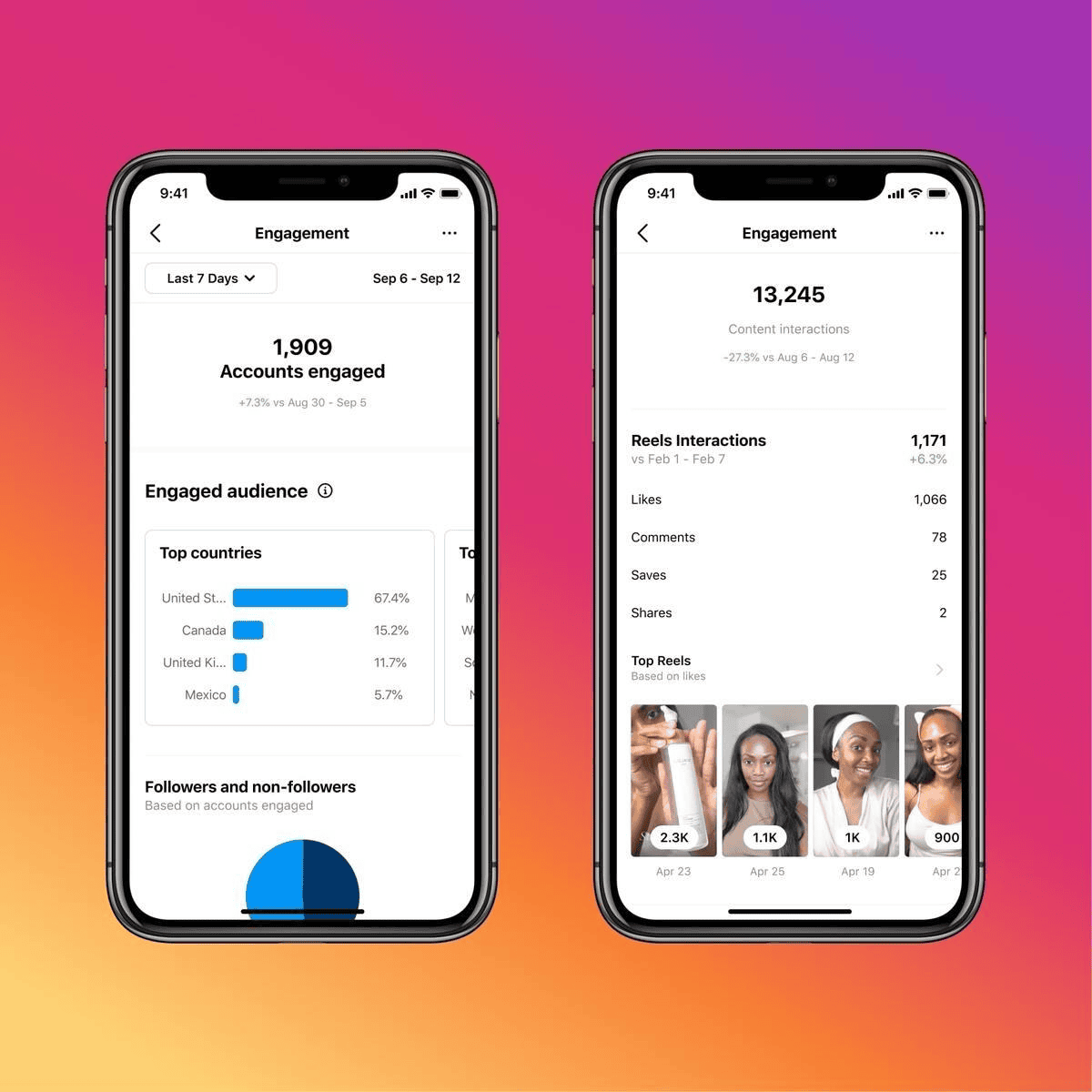
Instagram Insights is a useful starting point because it allows eligible creators and businesses to review performance without purchasing an additional analytics subscription.
Follow these steps.
Step 1: Open Your Instagram Profile
Launch the Instagram application on your Android or iPhone.
Log in to the account you want to analyze and open your profile.
Step 2: Access the Professional Dashboard
Look for the Professional Dashboard option on your profile.
If you are using an eligible Creator or Business account, you can access the dashboard and its available performance information.
Step 3: Open Insights
Select Insights to view your account performance.
Depending on your application version, you may see different labels and dashboard layouts.
Common performance information includes:
- Views.
- Interactions.
- Accounts reached.
- Accounts engaged.
- Follower growth.
- Content performance.
Step 4: Select a Date Range
Choose a suitable reporting period.
For example:
- Last 7 days for short-term analysis.
- Last 30 days for monthly performance.
- Last 90 days for broader trends.
Available date ranges can vary according to the Insights section and application version.
Step 5: Review Your Interactions
Open the interactions section to review available engagement information.
You can examine likes, comments, saves, shares, and other supported interactions.
For individual content, open the relevant post or Reel and select View Insights.
Step 6: Calculate Your Engagement Rate
Once you have collected your interaction totals, choose the appropriate formula.
For example, if a post receives 350 interactions and reaches 5,000 accounts:
350 ÷ 5,000 × 100 = 7%
Your reach-based engagement rate is 7%.
Important: Instagram Insights provides the underlying metrics, but you should not assume that every account has a single universal engagement percentage displayed automatically. The result depends on the formula you select.
How to Check Instagram Engagement Rate for Different Content Types
Instagram has several content formats, and each provides different opportunities for interaction.
Using one calculation without considering the content format may not provide a complete performance picture.
Instagram Photo Posts
For regular photo posts, consider:
- Likes.
- Comments.
- Saves.
- Shares.
Compare the total interactions with your follower count or the post’s reach.
Photo posts are useful for measuring reactions to product images, announcements, personal updates, and visual information.
Instagram Carousel Posts
Carousels contain multiple images or slides in a single post.
They can encourage users to spend more time exploring information, particularly when the content includes tutorials, educational tips, or step-by-step explanations.
Pay attention to saves, shares, and comments in addition to likes.
Instagram Reels
Reels are designed for short-form video discovery and entertainment.
When checking Reel performance, examine:
- Views.
- Reach or viewers.
- Likes.
- Comments.
- Saves.
- Shares.
- Watch time.
A Reel may receive many views but relatively few interactions. This can indicate that the video attracted attention without encouraging viewers to respond.
Instagram Stories
Stories provide a different type of engagement.
Useful metrics may include:
- Replies.
- Sticker interactions.
- Poll responses.
- Question responses.
- Link interactions, where available.
For Story analysis, choose a consistent definition of interactions and compare it with the relevant audience metric.
Best Instagram Engagement Rate Calculator Tools in 2026
Manual calculations are useful for beginners, but dedicated analytics tools can save time when managing multiple accounts.
Here are some options worth considering.
1. Instagram Insights
Instagram Insights is the best starting point for creators who want to evaluate their own accounts.
It provides native performance data and helps users understand how their content reaches and engages audiences.
Best for: Individual creators and small businesses.
2. Hootsuite
Hootsuite offers social media management and reporting features.
Its analytics capabilities help marketing teams monitor performance and organize social media activities across supported platforms.
Best for: Businesses managing several social accounts.
3. Sprout Social
Sprout Social provides social media analytics, reporting, and performance monitoring features.
It can help organizations examine engagement patterns and prepare structured reports.
Best for: Agencies and professional marketing teams.
4. Later
Later offers Instagram-focused scheduling and analytics features.
Its reporting capabilities can help creators evaluate content performance and understand how engagement changes over time.
Best for: Content creators and social media managers.
| Tool | Main advantage | Suitable users |
|---|---|---|
| Instagram Insights | Native performance metrics | Beginners |
| Hootsuite | Multi-platform reporting | Businesses |
| Sprout Social | Advanced analytics | Agencies |
| Later | Content planning and analytics | Creators |
Always review the features and pricing of third-party tools before subscribing. Available metrics depend on account permissions and the data each provider can access.
What Is a Good Instagram Engagement Rate in 2026?
One common question is whether an engagement rate of 2%, 3%, or 5% is considered good.
There is no single official Instagram engagement rate target that applies to every account.
Performance varies depending on:
- Industry.
- Audience size.
- Content format.
- Account age.
- Follower quality.
- Publishing frequency.
- Audience interests.
Some marketing reports publish average engagement benchmarks, but their results can differ because they use different formulas, datasets, and industries.
For example, a benchmark based on likes and comments divided by followers cannot be directly compared with a calculation that includes saves, shares, and reach.
A better approach is to establish your own performance baseline.
Review your last 10–20 comparable posts and calculate their engagement rates using the same method.
The median result can be more useful than the average because one unusually successful viral post may increase the average significantly.
For more information about understanding audience behavior, explore our guide to Instagram Audience Research Tools.
Common Mistakes to Avoid When Measuring Instagram Engagement
Even a simple calculation can produce misleading results if the wrong metrics are used.
Here are some mistakes to avoid.
1. Looking Only at Likes
Likes are easy to see, but they do not represent every type of engagement.
Comments, saves, and shares provide additional information about how users interact with your content.
2. Mixing Different Formulas
Never compare a follower-based rate with a reach-based rate as if they were identical.
Always label your calculation method.
3. Ignoring Fake or Inactive Followers
A large follower count does not guarantee an interested audience.
Suspicious follower growth and low-quality interactions can make an account appear more successful than it really is.
4. Comparing Different Content Formats
A Reel, photo post, carousel, and Story may perform differently.
Analyze similar formats separately whenever possible.
5. Evaluating Only One Post
A single post may perform unusually well or poorly.
Review several posts over a consistent period to understand the normal performance of your account.
6. Forgetting Paid Promotion
Paid distribution can change reach and interaction totals.
When comparing organic performance, separate paid and organic results whenever the available data allows it.
How to Improve Your Instagram Engagement Rate
After learning how to check Instagram engagement rate, the next step is to use the results to improve your content.
These practical approaches can help.
Create content that solves a problem.
Useful tutorials, explanations, checklists, and educational posts can encourage people to save and share your content.
Use engaging captions.
Write captions that provide context and invite meaningful discussion. Avoid asking unnecessary questions simply to increase comment numbers.
Publish original Reels.
Focus on a clear topic, strong opening, useful information, and an appropriate video length.
Use carousel posts strategically.
Break complicated information into easy-to-understand slides. Make each slide valuable rather than adding unnecessary pages.
Respond to genuine comments.
Replying to relevant comments helps maintain conversations and build a stronger community.
Understand your audience.
Review the subjects, formats, and topics that attract the most meaningful interactions.
You can also read our guide to Instagram Competitor Research Free to learn how to study other accounts and identify useful content opportunities.
Maintain a consistent publishing schedule.
A realistic schedule can help you develop a recognizable content routine. Focus on quality and audience relevance rather than posting excessively.
Frequently Asked Questions
1. How do I check my Instagram engagement rate?
You can check it manually by adding likes, comments, saves, and shares, then dividing the total by your follower count or reach and multiplying by 100. Instagram Insights provides the performance data needed for more accurate calculations on your own professional account.
2. What is the easiest way to calculate Instagram engagement?
The follower-based formula is one of the simplest methods: total interactions divided by total followers, multiplied by 100. You only need basic post metrics and your follower count to calculate the result.
3. Can I check another Instagram account’s engagement rate?
Yes. You can estimate another public account’s engagement rate using visible likes, comments, and follower numbers. However, private metrics such as saves, shares, and reach are generally unavailable unless the account owner provides access to the data.
4. Is Instagram Insights free?
Instagram Insights is available without an additional analytics subscription for eligible professional accounts. It provides useful information about account activity, content interactions, audience reach, and performance.
5. Does a higher engagement rate mean better Instagram growth?
A higher engagement rate can indicate stronger audience interaction, but it does not guarantee follower growth, sales, or business success. You should also evaluate reach, audience quality, profile visits, conversions, and other relevant goals.
6. How often should I check my Instagram engagement rate?
Review individual posts after they have had sufficient time to collect interactions, and examine account-level performance weekly or monthly. Comparing similar posts over a consistent reporting period gives a more useful picture than checking the percentage repeatedly throughout the day.
7. What is the difference between engagement rate by followers and reach?
Follower-based engagement compares interactions with the total follower count, while reach-based engagement compares interactions with the unique accounts that saw the content. Reach-based measurement is generally more useful for evaluating your own content effectiveness.
8. Can Instagram Reels have a different engagement rate from photo posts?
Yes. Reels and photo posts have different distribution and viewing patterns. Reels can attract views from non-followers, while photo posts may generate interactions from an established audience. Analyze each format separately for a fair comparison.
Final Thoughts
Understanding how to check Instagram engagement rate gives you a better way to evaluate your social media performance.
Instead of focusing entirely on follower numbers, you can examine likes, comments, saves, shares, reach, and views to understand how people respond to your content.
Start with Instagram Insights if you manage your own professional account. Use the follower-based formula for simple comparisons and reach-based calculations when evaluating your individual posts.
Most importantly, track performance consistently and use the results to guide your next content decisions.
Instagram growth is not simply about attracting more followers. It is about building an audience that finds your content useful, relevant, and worth interacting with.