
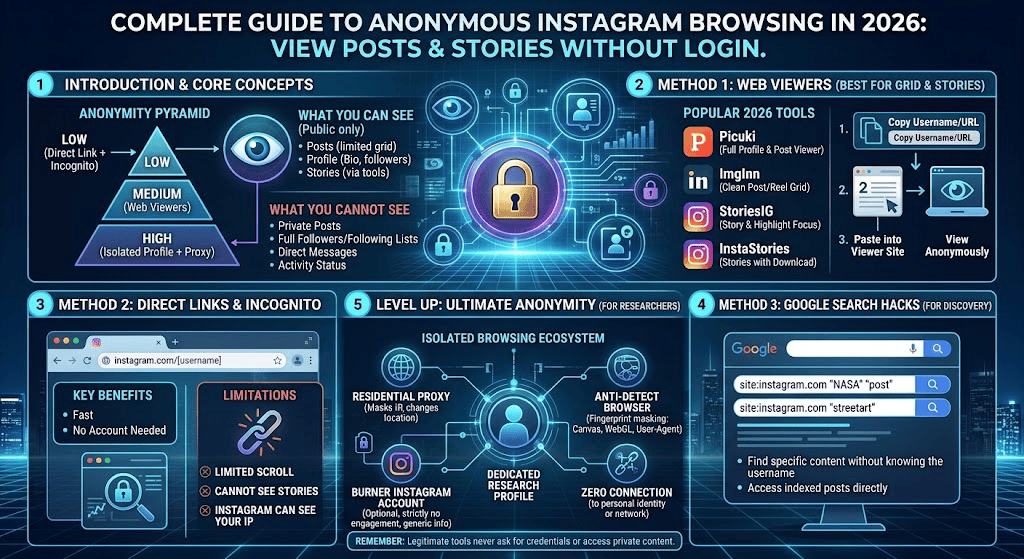
Learn how to view Instagram posts without login using public profile links, Google Search and safe browsing methods. See what works and what to avoid.
Introduction
Have you ever received an Instagram profile link but couldn’t view the posts because Instagram displayed a login screen? This can be frustrating, especially when you don’t have an account or simply don’t want to sign in.
The good news is that you may still be able to view Instagram posts without login by opening public profile links, visiting direct post URLs, or finding publicly indexed content through Google Search.
However, Instagram does not provide unlimited guest browsing. Some pages may load without an account, while others may display a login prompt or restrict further access.
In this guide, you’ll learn seven practical ways to view Instagram posts without login and browse public content without signing in. We’ll also explain the limitations, privacy risks, and methods you should avoid.
Can You View Instagram Without an Account?
Yes, it is sometimes possible to view public Instagram profiles and posts without creating an account.
Instagram allows public content to be viewed by a wider audience. However, the experience for visitors who are not logged in can be limited.
For example, you may be able to open a public profile and see some of its information. When you try to scroll further, open additional posts, or use certain features, Instagram may ask you to log in.
Your results can vary depending on the account, browser, device, and Instagram’s current access restrictions.
Private profiles are different. Their posts are available only to approved followers. No legitimate viewer website can guarantee access to private Instagram content.
Why Do People Want to View Instagram Posts Without Login?
There are several reasons someone may want to view Instagram posts without login or browse Instagram without signing in.
Privacy: Some visitors prefer not to create an account just to check a public profile or view a particular post.
Research: Marketers and business owners may want to review public brand profiles, product photos, and competitor content.
Convenience: Someone may receive an Instagram link from a friend and simply want to open it without installing the app.
Occasional browsing: If you only need to check a public post once in a while, creating an account may feel unnecessary.
Whatever your reason, remember that public access does not mean every Instagram feature is available without an account. You can also explore more Instagram-related guides on Pixwox.
7 Ways to View Instagram Posts Without Login
Here are seven methods you can try if you want to view Instagram posts without login. Their availability may change as Instagram updates its website and access rules.
1. Open a Public Instagram Profile Directly
The easiest way to view Instagram posts without login is to open the public profile directly in your web browser.
You don’t need to install the Instagram app for this method.
Steps:
- Open Chrome, Firefox, Safari, or another browser.
- Type
https://www.instagram.com/username/into the address bar. - Replace
usernamewith the exact Instagram handle. - Press Enter to open the profile.
- Check whether the profile information and available public posts load.
For example, if the username is example, the profile address would be https://www.instagram.com/example/.
Limitation: Instagram may display a login prompt or restrict what you can see. There is no guaranteed number of posts that every visitor can access.
2. Open a Direct Instagram Post Link
If someone has shared an Instagram post with you, try opening its direct link instead of visiting the account’s homepage.
A direct post link usually contains a URL with /p/ followed by a post identifier.
Steps:
- Copy the Instagram post URL.
- Open a browser on your phone or computer.
- Paste the link into the address bar.
- Press Enter.
- Check whether the public post loads.
This method is useful when you already have the exact link and don’t need to explore the entire profile.
Instagram may still request a login, so this method is not guaranteed to work for every post.
3. Find Public Instagram Posts Through Google Search
Google Search can help you discover public Instagram profiles and pages that have been indexed by the search engine. It is another option when you want to view Instagram posts without login but don’t know the direct profile address.
This is useful when you know the person’s username, business name, or a topic related to the post.
Try searches such as:
site:instagram.com/usernamesite:instagram.com/p/ travel photographyInstagram public posts [business name][username] Instagram profile
Replace the example terms with the account or topic you want to find.
Google may display a profile result, page title, or snippet. Select a result to see whether Instagram allows the page to open.
Important: Google does not provide its old Cached page option in Search results. Search snippets are also not a complete or live copy of an Instagram profile.
For more information about how Google discovers and displays web pages, visit Google Search Central.
4. Search for the Instagram Username on the Web
Sometimes you may not know the exact Instagram profile address. In that case, search for the username or account name on the web.
For example, enter the following into Google:
"username" Instagram
You can also search for a business name together with the word Instagram.
This may help you find the correct public profile, links shared on other websites, or pages mentioning that account.
Check the result carefully before opening it. Similar usernames can belong to different people or businesses.
5. Use a Public Post or Reel Shared on Another Website
Some creators and businesses share their Instagram content on websites, blogs, or other social media platforms.
If the original post has been embedded or shared elsewhere, you may be able to view some of its content without opening Instagram directly.
Try searching for the post caption, creator name, or a distinctive phrase from the content.
Keep in mind that an embedded post may stop displaying if the creator removes it, changes its privacy settings, or deletes the original post.
6. Try a Third-Party Instagram Viewer Carefully
Some websites advertise themselves as Instagram profile viewers. They claim to display public profiles, photos, Reels, or other Instagram content without requiring visitors to sign in.
These services may appear useful when you want to view Instagram posts without login, but they are independent websites. Their availability, features, and reliability can change at any time.
Before using one, follow these safety precautions:
- Never enter your Instagram password into an unofficial viewer.
- Avoid websites that request unnecessary personal information.
- Do not download unknown apps, browser extensions, or files.
- Be cautious of fake download buttons and aggressive pop-ups.
- Do not assume that a website is private or anonymous simply because it claims to be.
A third-party viewer cannot legitimately unlock a private account. If a website promises access to private posts without the owner’s approval, treat that claim as a warning sign.
7. Use a Browser’s Private or Incognito Window for Basic Privacy
A private or incognito browser window can help prevent browsing history and certain site data from being saved in your regular browser session.
To try it:
- Open Chrome or another browser.
- Start a new Incognito or Private window.
- Paste the public Instagram profile or post link.
- Check whether the content is available without signing in.
This is a browser privacy feature, not a way to bypass Instagram’s restrictions.
It does not make you completely anonymous, hide your activity from every website, or guarantee access to more Instagram posts.
What Can You See on Instagram Without Logging In?
The content available to visitors can vary. The table below provides a general guide for anyone trying to view Instagram posts without login.
| Instagram content | Without login |
|---|---|
| Public profile information | May be visible |
| Public profile posts | May be visible with limitations |
| Public Reels | May open through a direct link |
| Private account posts | Not available |
| Likes and comments | May be restricted |
| Direct messages | Not available |
| Following or interacting with accounts | Requires an account |
| Liking or commenting | Requires an account |
| Personal saved collections | Requires an account |
The most important distinction is between public and private content. Public posts may be accessible through a browser, but private posts remain restricted to approved followers.
Are Third-Party Instagram Viewers Safe?
Not every website that advertises an Instagram viewer is safe.
Some services may display excessive advertisements, redirect visitors to unrelated pages, or request information they do not need.
Before using an Instagram viewer, check the website’s reputation and privacy policy. Avoid services that ask you to connect your Instagram account or provide your password.
Also remember that a third-party website may collect technical information such as browser details or IP address data. Using a viewer does not automatically mean your browsing is anonymous.
For the safest experience, start with a direct public Instagram link or a Google Search rather than giving personal information to an unfamiliar website.
You can review Instagram’s official information and safety guidance through the Instagram Help Center.
Can You View Instagram Stories Without an Account?
Instagram Stories have different access and visibility rules from regular profile posts.
Some third-party websites claim to display public Stories without login. However, their features and availability are not guaranteed, and you should not rely on them to access every Story.
Private Stories and Close Friends content are not legitimately available to people who have not been given permission to view them.
If you need to see a Story, the most reliable option is to use Instagram with an account that has the appropriate access.
Is It Legal to View Instagram Posts Without Login?
Viewing publicly available content through an ordinary browser is generally different from trying to access private information without permission.
However, the legality of downloading, copying, scraping, or redistributing content can depend on the circumstances, applicable laws, and the platform’s terms.
Keep these basic principles in mind:
- View only content that is publicly available to you.
- Do not attempt to access private accounts without permission.
- Do not use hacking tools or services claiming to unlock private profiles.
- Respect creators’ copyright when sharing or reusing their photos and videos.
- Follow the relevant platform rules and applicable laws.
If you want to reuse someone’s content, seek permission from the creator rather than assuming that public visibility gives you permission to republish it.
Frequently Asked Questions
1. Can I view Instagram posts without login?
Yes, some public Instagram profiles and posts may be accessible through direct browser links. Instagram can still display login prompts or restrict further browsing.
2. Can I search Instagram without an account?
You can use Google Search to find publicly indexed Instagram profiles and posts. However, Instagram’s own search and discovery features may require you to sign in.
3. Can I view private Instagram profiles without following them?
No legitimate method can provide access to private posts without the account owner’s approval. Avoid websites that promise to unlock private profiles.
4. Does Instagram notify someone when I view their profile?
Instagram does not provide a standard notification identifying every person who visits a profile. However, certain interactions and Story views have different visibility rules.
5. Can I view Instagram Reels without an account?
Some public Reels may open through direct links in a browser. Instagram may still ask you to sign in, and access can vary.
6. Are Instagram viewer websites free?
Some advertise free access, while others offer paid features or display advertisements. Check their terms carefully and never provide your Instagram password to an unofficial service.
7. Does Incognito mode let me view more Instagram posts?
No. Incognito mode mainly limits what your browser saves locally. It does not remove Instagram’s login requirements or guarantee access to additional content.
Conclusion
It is possible to view Instagram posts without login in some situations, especially when you have a direct link to a public profile or post.
The simplest options are opening a public profile URL, using a direct post link, and searching for indexed content through Google. Third-party viewer websites may offer additional browsing options, but their reliability and privacy practices should be checked carefully.
Remember that Instagram access can change, and no method should be presented as a guaranteed way to browse every public post. Private profiles remain private unless the account owner approves access.