
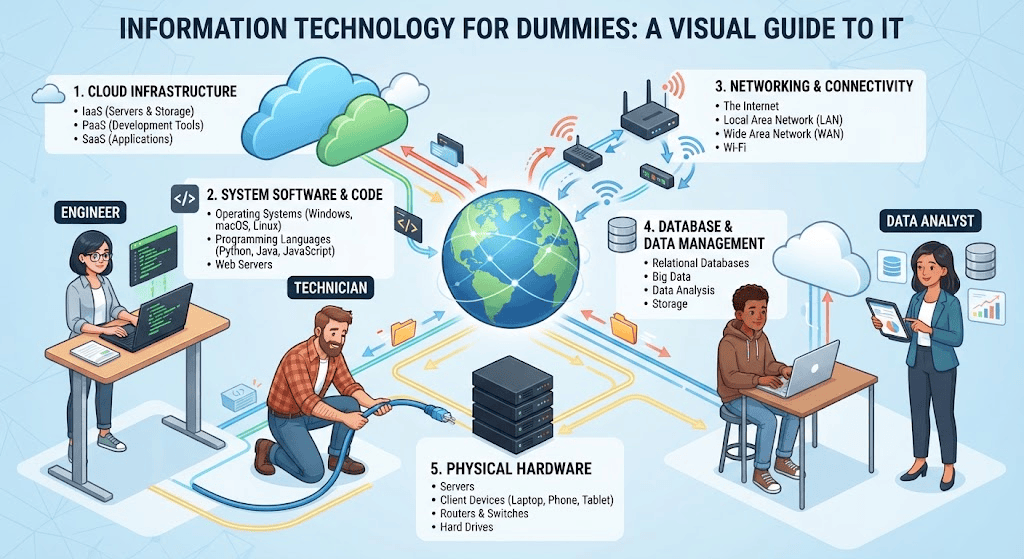
New to tech? This information technology for dummies guide breaks down IT basics, careers, tools, and trends in plain English — no jargon required.
What Is Information Technology for Dummies? (Simple Definition)
To explain information technology for dummies in the simplest terms: Information technology (IT) is the use of computers, software, networks, and storage systems to create, process, store, secure, and exchange electronic information.
In plain terms: any time a computer helps you send an email, save a file, stream a video, swipe a debit card, or video-call a friend, information technology is working in the background to make it happen.
IT covers three basic jobs:
- Storing information (hard drives, cloud storage, databases)
- Processing information (computers, servers, software)
- Moving information (networks, the internet, Wi-Fi)
Every app, website, ATM, smart TV, and hospital records system runs on some combination of these three functions. That’s the entire foundation of IT — everything else is just detail.
A Brief History of IT (Why It Matters Today)
Understanding where IT came from helps explain why it’s structured the way it is today.
| Era | What Happened | Why It Matters Now |
|---|---|---|
| 1940s–1960s | First computers built for military and scientific calculations | Introduced the idea of programmable machines |
| 1970s–1980s | Personal computers (Apple, IBM) enter homes and offices | IT becomes a business function, not just a lab tool |
| 1990s | The internet goes mainstream | Networking becomes central to IT |
| 2000s | Broadband, smartphones, and cloud computing emerge | IT shifts from “office tool” to “everywhere tool” |
| 2010s–2020s | Cloud, AI, and cybersecurity dominate | IT becomes critical infrastructure for every industry |
Each shift added a new layer of complexity — which is exactly why beginners often feel overwhelmed. Modern IT isn’t one thing; it’s a stack of decades of innovation layered on top of each other.
Core Components of Information Technology for Dummies
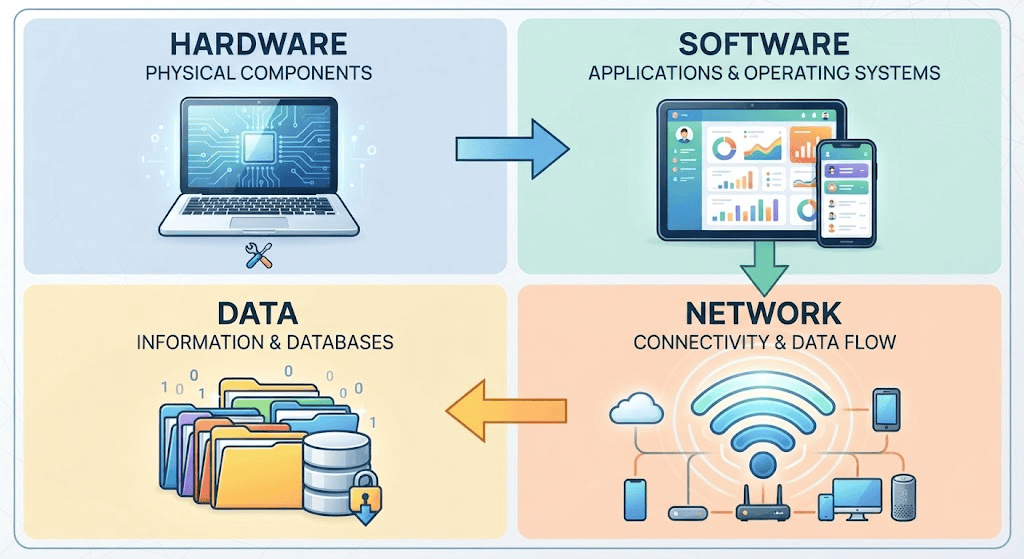
To really grasp IT, break it down into four building blocks. Almost every concept covered in an information technology for dummies crash course fits into one of these categories:
1. Hardware
The physical equipment: laptops, desktops, servers, routers, smartphones, printers, and storage drives. If you can touch it, it’s hardware.
2. Software
The instructions that tell hardware what to do. This includes:
- Operating systems (Windows, macOS, Linux, Android)
- Applications (Word, Excel, Chrome, Instagram)
- Enterprise software (accounting systems, hospital records platforms, inventory tools)
3. Networks
The infrastructure that lets devices talk to each other — Wi-Fi routers, cellular networks, the internet, and internal company networks (called LANs and WANs). Without networks, your phone couldn’t send a single text message.
4. Data and Databases
Information itself — customer records, financial transactions, medical files, social media posts. Databases are the organized systems (like MySQL or Microsoft SQL Server) that store and retrieve this data efficiently.
How Information Technology Works in Everyday Life
IT isn’t just an office concept — it’s woven into nearly every daily activity. Here’s how the core components show up in ordinary moments:
| Everyday Activity | IT Working Behind the Scenes |
|---|---|
| Paying with a debit card | Network sends transaction data to your bank’s database in seconds |
| Streaming a show on Netflix | Cloud servers store the video; networks deliver it to your device |
| Using Google Maps | GPS hardware + software processes location data in real time |
| Sending a WhatsApp message | Data travels through mobile networks and cloud servers |
| Hospital pulling up your medical history | A secure database retrieves records instantly |
| Online shopping checkout | Software processes payment; databases update inventory |
Once you see IT this way, it stops being abstract. It’s the invisible plumbing running underneath modern life.
Information Technology vs. Computer Science vs. Computer Engineering
Beginners often confuse these three fields. Here’s the difference in simple terms:
| Field | Focus | Typical Work |
|---|---|---|
| Information Technology (IT) | Installing, managing, and maintaining tech systems | Network admin, help desk, cloud support, cybersecurity |
| Computer Science (CS) | Designing algorithms and building software | Software engineer, app developer, data scientist |
| Computer Engineering | Designing hardware and hardware-software integration | Chip design, embedded systems, hardware architecture |
If computer science is about building the car, IT is about keeping it running, maintained, and safe on the road. Both matter — they just solve different problems.
Common IT Job Roles for Beginners
One of the best things about IT is that you don’t need a four-year degree to start. Many entry points exist for people with basic training or certifications.
| Job Title | What They Do | Typical Entry Requirement |
|---|---|---|
| Help Desk Technician | Troubleshoots basic computer/software issues for employees | Certification or associate degree |
| IT Support Specialist | Manages hardware setup, software installs, minor network fixes | Certification |
| Network Technician | Sets up and maintains routers, switches, and connectivity | Networking certification |
| Cybersecurity Analyst (entry level) | Monitors systems for threats and suspicious activity | Security certification |
| Cloud Support Associate | Assists with cloud platform setup and monitoring | Cloud certification (AWS, Azure) |
| Data Entry / Database Support | Maintains and organizes company data | Basic technical training |
These roles are often called the “front door” of IT — accessible entry points that lead to more advanced specializations later.
Popular IT Certifications for Beginners
Certifications are one of the fastest ways into IT without a traditional computer science degree. Some of the most recognized beginner-friendly certifications include:
- CompTIA A+ — covers hardware, operating systems, and troubleshooting basics
- CompTIA Network+ — introduces networking fundamentals
- CompTIA Security+ — an entry point into cybersecurity roles
- Microsoft Certified: Azure Fundamentals — introduces cloud computing concepts
- Google IT Support Professional Certificate — a beginner-friendly, self-paced online program
Organizations like CompTIA maintain updated certification paths and study resources, making them a reliable starting point if you’re serious about entering the field professionally.
Key IT Concepts Every Beginner Should Know
Beyond hardware and software basics, a few modern concepts come up constantly in IT conversations. Here’s a quick, no-jargon breakdown:
Cloud Computing
Instead of storing files and running software on your own computer, cloud computing lets you use remote servers over the internet — think Google Drive, Dropbox, or Netflix’s video servers. It’s why you can access your files from any device, anywhere.
Cybersecurity
Cybersecurity is the practice of protecting systems, networks, and data from unauthorized access, theft, or damage. As more of daily life moves online, this has become one of the fastest-growing areas of IT. Government bodies such as the Cybersecurity and Infrastructure Security Agency (CISA) publish guidance that shapes how organizations defend against digital threats.
Networking
Networking is how devices communicate — through Wi-Fi, Ethernet cables, or the broader internet. Every time your phone connects to Wi-Fi, it’s relying on networking protocols working correctly.
Internet of Things (IoT)
This refers to everyday physical objects — thermostats, fridges, doorbells, fitness trackers — connected to the internet so they can send and receive data.
Artificial Intelligence in IT
AI is increasingly built into IT systems for tasks like automated threat detection, chatbots, predictive maintenance, and data analysis — reshaping how IT teams manage and secure systems.
How to Start a Career in IT (Step-by-Step for Beginners)
If this guide has sparked interest in actually working in IT, here’s a realistic roadmap:
- Pick a starting lane. Choose a general direction — support/help desk, networking, cybersecurity, or cloud computing.
- Get a foundational certification. CompTIA A+ is widely considered the best starting certification for absolute beginners.
- Build hands-on practice. Use free tools like virtual machines, home lab setups, or free-tier cloud accounts (AWS, Azure) to practice real skills.
- Apply for entry-level roles. Help desk and IT support jobs rarely require a degree — they value certifications and problem-solving ability.
- Specialize over time. After 1–2 years of general experience, most IT professionals move into a specialty: security, cloud architecture, networking, or systems administration.
- Keep learning continuously. IT changes fast. Following updates from certification bodies and vendor documentation keeps skills current.
The biggest misconception beginners have is that IT requires years of coding knowledge. In reality, most entry-level IT roles focus on troubleshooting, communication, and systematic problem-solving — skills that can be learned through practice, not just theory.
The Future of Information Technology
A few trends are shaping where IT is headed, and understanding them now gives beginners an advantage:
- AI-integrated IT operations — automated systems increasingly monitor networks and flag issues before humans do.
- Greater demand for cybersecurity skills — as attacks grow more sophisticated, skilled defenders are in short supply.
- Hybrid and multi-cloud environments — companies are relying less on single providers and more on distributed cloud strategies.
- Remote IT support growth — many entry-level IT jobs are now fully remote, widening access to the field globally.
- Sustainability in IT (Green IT) — energy-efficient data centers and hardware recycling are becoming standard practice.
None of these trends require abandoning the fundamentals covered earlier — they build directly on top of them.

Common IT Myths Debunked
Myth: “You need to be a math genius to work in IT.” Reality: Most IT roles rely more on logical troubleshooting and communication than advanced mathematics.
Myth: “IT is just fixing broken computers.” Reality: IT spans networking, security, cloud infrastructure, data management, and system architecture — troubleshooting is just one small part.
Myth: “You need a computer science degree to work in IT.” Reality: Many professionals enter IT through certifications, bootcamps, or self-taught skills rather than a traditional degree.
Myth: “IT and coding are the same thing.” Reality: Coding falls more under software development; IT is primarily about managing and securing systems, not writing applications.
Frequently Asked Questions
What does IT stand for?
IT stands for Information Technology — the use of computers, networks, and software to manage and process information.
Is IT a good career for beginners with no experience?
Yes. Entry-level roles like help desk support and IT support specialist are specifically designed for people starting out, especially with a basic certification.
Do I need to know how to code to work in IT?
Not necessarily. Many IT roles, especially in support, networking, and systems administration, don’t require coding. Coding becomes more relevant in software development or DevOps-focused roles.
What’s the difference between IT and cybersecurity?
Cybersecurity is a specialized branch within IT focused specifically on protecting systems and data from threats, while IT covers the broader management of technology infrastructure.
How long does it take to learn IT basics?
Foundational knowledge can be built in a few months through certifications like CompTIA A+, though deeper expertise develops over years of hands-on experience.
Conclusion
Information technology can feel intimidating from the outside, but at its core, it’s simply the system of tools, networks, and processes that let information move, get stored, and stay protected. Once you understand the four building blocks — hardware, software, networks, and data — the rest of the field becomes far less mysterious.
Whether you’re reading this guide out of curiosity or as the first step toward an IT career, the key takeaway is this: information technology is learnable, accessible, and more beginner-friendly than most people assume. Start with the fundamentals, get hands-on practice, and the rest builds naturally from there.