
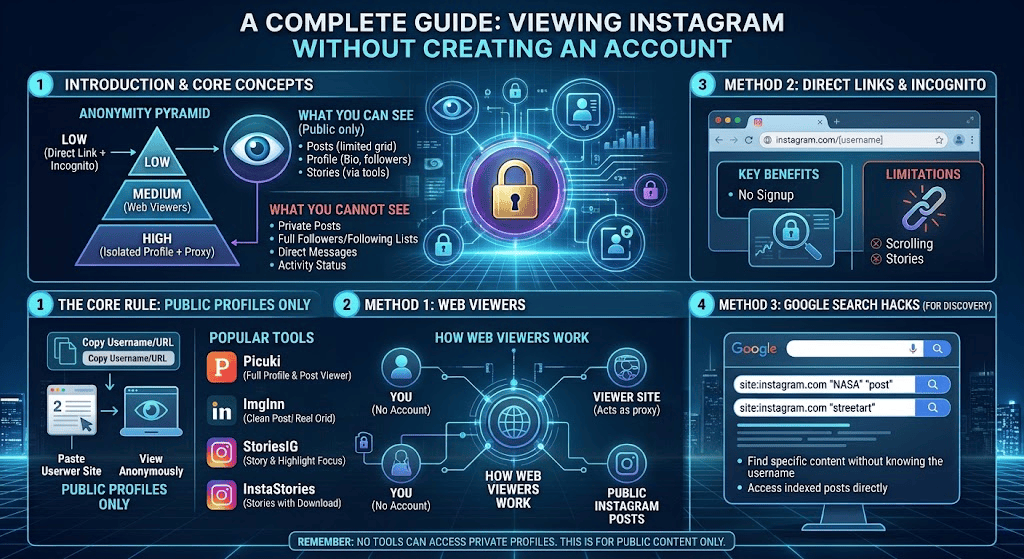
Learn how to view Instagram without creating an account. Discover 10 easy ways to browse public profiles, photos, posts, and Reels without signing up.
How to View Instagram Without Creating an Account: 10 Easy Ways
Instagram is one of the world’s most popular social media platforms, where people share photos, videos, Reels, Stories, and updates about their daily lives. However, not everyone wants to create an account just to look at a few public posts or visit someone’s profile.
If you want to explore Instagram without registering, you may be wondering whether it is possible to access profiles, photos, videos, and other public content without signing in.
The good news is that there are several ways to view publicly available Instagram content without creating an account. You can use a web browser, open direct profile links, search engines, or explore content shared on other websites.
In this guide, you will discover 10 practical ways to view Instagram without creating an account, understand what works, and learn which limitations you should expect. We will also explain how to protect your privacy when using third-party Instagram viewer websites.
Can You View Instagram Without Creating an Account?
Yes, you can view some Instagram content without creating an account, but your access is limited.
Instagram allows public profiles and posts to be viewed on the web. You can sometimes open a public profile directly through your browser and see its profile information and available posts.
However, Instagram may display a login or sign-up prompt when you try to explore more content. The amount of information available can also change depending on the account, browser, device, and Instagram’s current access restrictions.
Here is a quick overview:
| Instagram Feature | Without an Account |
|---|---|
| Public profile information | Sometimes available |
| Public profile photos | Limited access |
| Public posts | Sometimes available |
| Instagram Reels | Direct links may work |
| Instagram Stories | Generally restricted |
| Private profiles | Not accessible |
| Likes and comments | Limited or restricted |
| Following accounts | Not available |
| Sending direct messages | Not available |
| Creating posts | Not available |
Important: Public content does not mean unrestricted access to every Instagram feature. Private posts and other restricted content remain protected.
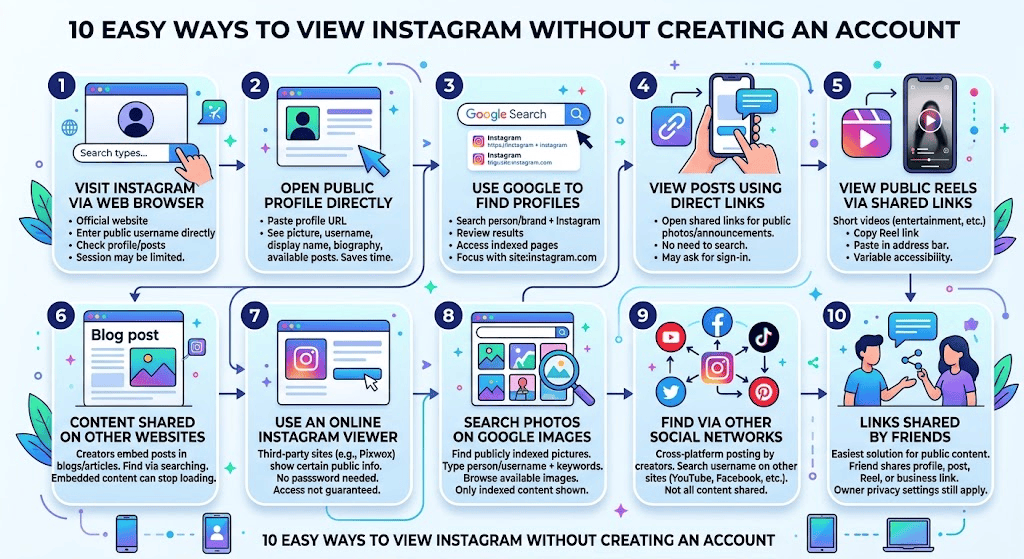
10 Easy Ways to View Instagram Without Creating an Account
You do not necessarily need to install the Instagram application or register a new account to explore public content. Here are ten practical methods to try.
1. Visit Instagram Through a Web Browser
The easiest way to view Instagram without creating an account is to visit its official website through a web browser.
You can use Google Chrome, Microsoft Edge, Firefox, Safari, or another standard browser.
Follow these steps:
- Open your preferred web browser.
- Visit the official Instagram website.
- Find the username of the public profile you want to explore.
- Enter the profile address directly into the browser.
- Press Enter to open the page.
- Check which public profile details and posts are available.
Replace “username” with the actual Instagram handle.
This method is useful when you already know the username of a public Instagram account.
Instagram may display a sign-up prompt or limit further browsing, so access is not guaranteed for every profile or session.
2. Open a Public Instagram Profile Directly
Another simple method is to open a direct link to a public Instagram profile.
You do not need to start from Instagram’s homepage. If someone shares a profile URL with you, you can paste that link directly into your browser.
This can save time when you only want to check a particular creator, business, brand, or public figure.
A public Instagram profile may display:
- Profile picture
- Username
- Display name
- Biography
- Website information
- Follower and following counts
- Available public posts
The information you can see depends on Instagram’s current logged-out browsing restrictions.
This approach is particularly useful for people researching public accounts or checking a business profile before contacting the company through another channel.
3. Use Google Search to Find Instagram Profiles
Google Search is another useful option when you want to find public Instagram profiles without registering.
Instead of searching directly inside Instagram, you can use Google to discover publicly indexed Instagram pages.
Follow these steps:
- Open Google.
- Enter the person’s name, brand name, or business name.
- Add the word Instagram to your search.
- Review the available search results.
- Open the relevant public profile or indexed page.
You can also try searches such as:
- Business name Instagram
- Public Instagram profile
- Creator name Instagram account
- Brand Instagram photos
For more specific results, use Google’s site search:
site:instagram.com username
This tells Google to focus on pages from Instagram’s website.
However, search engines do not index every Instagram post. Results may be incomplete, outdated, or unavailable.
4. View Instagram Posts Using Direct Links
If someone sends you an Instagram post link, you may be able to open it without creating an account.
You can open the link in Chrome, Firefox, Safari, or another browser.
A direct post link is useful when you want to:
- View a particular public photo
- Read an available caption
- Check a shared post
- Explore a public announcement
- Open a post shared by a friend
The important advantage is that you do not need to search for the profile manually.
Nevertheless, Instagram may require you to sign in before displaying the complete post or additional information.
5. View Public Instagram Reels Through Shared Links
Instagram Reels are short-form videos that people use to share entertainment, tutorials, product demonstrations, travel experiences, and educational content.
If you receive a direct link to a public Reel, try opening it in your regular browser.
Here is how:
- Copy the Instagram Reel link.
- Open your preferred browser.
- Paste the link into the address bar.
- Press Enter.
- Check whether the video loads.
Some public Reels may be accessible without signing in, while others may show a login prompt.
If the video does not load, you can look for the same Reel if its creator has shared it on another public platform.
Do not assume that every Reel can be watched without an Instagram account.
6. Explore Instagram Content Shared on Other Websites
Many creators, bloggers, news websites, and businesses share Instagram posts on their own websites.
These embedded posts can sometimes be viewed without visiting Instagram directly.
For example, a travel blogger might embed an Instagram photo in an article about a destination. Similarly, a company may display its Instagram posts on its website.
You can discover this content by searching for:
- Instagram posts embedded in blogs
- Public Instagram posts shared by websites
- Brand Instagram updates
- Creator posts mentioned in online articles
This method is useful when Instagram’s website is displaying a sign-in restriction.
However, embedded content can stop loading if the original post is deleted, the account becomes private, or the creator changes its availability.
7. Use an Online Instagram Viewer
An online Instagram viewer is a third-party website designed to display certain publicly available Instagram information through a browser.
Some viewer websites allow users to enter a public Instagram username and check whether profile information or public posts are available.
For example, you can explore the Pixwox Instagram Public Content Viewer to learn about viewing publicly available Instagram content.
The general process is straightforward:
- Open an online Instagram viewer website.
- Find its username search option.
- Enter the public Instagram username.
- Start the search if the service supports it.
- Review the information that the website can legitimately display.
Before using any third-party viewer, consider its privacy and security practices.
A trustworthy service should not require your Instagram password just to show public information.
Also remember that third-party websites are not official Instagram services. Their availability, accuracy, and features may change.
No legitimate viewer can guarantee access to private profiles or restricted content.
8. Search for Instagram Photos and Videos on Google Images
Google Images can help you discover publicly indexed pictures associated with Instagram accounts.
This method is particularly helpful when you are looking for a specific photograph, product image, travel destination, or public creator.
Try these steps:
- Visit Google Images.
- Enter the person’s name or Instagram username.
- Add relevant keywords describing the picture.
- Browse the available image results.
- Open the source when available.
For example, you might search for:
- Instagram travel photography
- Public Instagram food posts
- Brand product photos Instagram
- Creator photography username
Keep in mind that Google Images does not provide access to an entire Instagram account. It only displays images that have been indexed and made available in search results.
Some images may also lead to deleted or unavailable pages.
9. Find Public Instagram Content Through Other Social Networks
Many Instagram creators share their content across multiple social media platforms.
For example, a creator may publish the same video on Instagram, YouTube Shorts, TikTok, Facebook, or another public website.
If you cannot access an Instagram post directly, searching for the creator’s name on another platform may help you find the same publicly shared content.
You can try:
- Searching the creator’s username on YouTube.
- Looking for the same video on Facebook.
- Checking publicly available TikTok posts.
- Visiting the creator’s official website.
- Searching for the original content through Google.
This method is useful when you want to follow public updates without registering for Instagram.
However, not every creator shares content across multiple platforms.
10. Use Public Instagram Links Shared by Friends
Sometimes the easiest solution is to ask someone to share the direct link to the content you want to see.
For example, if a friend sends you a link to a public Instagram photo, Reel, or profile, you can try opening it directly in your browser.
This removes the need to search for the account yourself.
You can ask someone to share:
- A public profile link
- A specific Instagram post
- A public Reel
- A business profile
- A publicly available announcement
This approach is especially useful for occasional browsing.
Remember that receiving a link does not give you permission to access private content. The account owner’s privacy settings still apply.
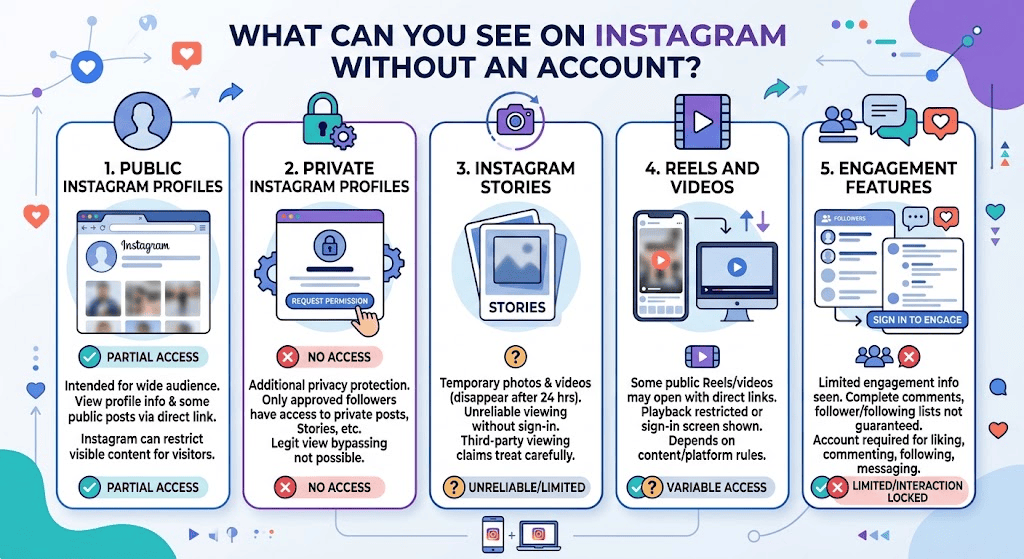
What Can You See on Instagram Without an Account?
Understanding Instagram’s access restrictions can help you choose the right browsing method.
Here is a closer look at the main features.
Public Instagram Profiles
Public profiles are intended to make content available to a wider audience.
You may be able to view profile information and some public posts through a direct browser link.
However, Instagram can restrict how much content appears to visitors who are not signed in.
Private Instagram Profiles
Private Instagram accounts have additional privacy protection.
Only approved followers can access their private posts, Stories, and other restricted content.
You cannot legitimately use an Instagram viewer to bypass these restrictions.
If you want to see a private account’s posts, the appropriate option is to request permission from the account owner.
Instagram Stories
Instagram Stories are temporary photos and videos that generally disappear after 24 hours unless saved as Highlights.
Viewing Stories without an account is unreliable because Instagram commonly requires users to sign in.
Third-party websites may advertise anonymous Story viewing, but their claims should be treated carefully.
Instagram Reels and Videos
Some public Reels and videos may open through direct links.
However, Instagram can restrict video playback or show a sign-in screen.
Availability depends on the content and the platform’s current restrictions.
Instagram Comments and Followers
You may see limited information about public engagement, but complete access to comments, followers, and following lists is not guaranteed without signing in.
Interactive features such as liking, commenting, following, and messaging require an account.
Is It Safe to Use Third-Party Instagram Viewer Websites?
Third-party Instagram viewer websites can be convenient, but you should understand their limitations before using them.
Not every website advertising an Instagram viewer provides a reliable or secure experience.
Consider these safety tips:
1. Never share your Instagram password
A website should not need your Instagram login credentials simply to display public content.
2. Avoid suspicious downloads
Be careful with websites that ask you to download unknown applications, browser extensions, or software.
3. Check website privacy policies
Look for information about data collection, cookies, storage, and how the service handles visitor information.
4. Avoid unrealistic promises
A website claiming that it can unlock every private Instagram account should be treated as suspicious.
5. Use a secure browser
Keep your browser updated and avoid clicking unfamiliar advertisements or suspicious links.
6. Respect other people’s privacy
Only access information that is publicly available or that you have permission to view.
You can also review Meta’s Safety and Privacy Information to understand how social media privacy controls work.
Benefits of Viewing Instagram Without Creating an Account
There are several reasons why people prefer browsing public Instagram content without registering.
1. No Registration Required
You do not have to complete a sign-up process or create another social media account just to check a public profile.
2. Less Account Management
You do not need to remember another password, manage notifications, or maintain an additional social media profile.
3. Convenient for Occasional Browsing
If you only want to check a public business page or view a particular post, browser-based access may be enough.
4. Useful for Research
Students, bloggers, marketers, and researchers may use publicly available Instagram information to understand brands, creators, and online trends.
5. Access Through Different Devices
You can try opening public Instagram links using a desktop computer, laptop, tablet, or smartphone browser.
The actual browsing experience may differ between devices.
Limitations of Browsing Instagram Without Signing In
Although there are different ways to explore public Instagram content, browsing without an account has some important limitations.
- You cannot access private posts without approval.
- Instagram may display sign-up prompts.
- You cannot follow accounts.
- You cannot like or comment on posts.
- Direct messaging is unavailable.
- Some Reels and videos may not load.
- Story viewing is generally restricted.
- Complete search and Explore functionality is unavailable.
- Third-party viewer services may stop working.
These limitations are part of Instagram’s platform and privacy controls.
If you regularly need Instagram’s interactive features, creating an account may be more convenient.
Frequently Asked Questions (FAQs)
1. Can I view Instagram without creating an account?
Yes. You can sometimes view public Instagram profiles and posts through a web browser without creating an account. However, Instagram limits logged-out browsing and may display a sign-up prompt.
2. How can I browse Instagram without logging in?
Open a public Instagram profile directly using its web address. You can also try opening shared post links, searching Google, or exploring content embedded on other websites.
3. Can I view private Instagram profiles without an account?
No. Private Instagram posts are only available to approved followers. No legitimate viewer website can guarantee access to private content without the owner’s permission.
4. Can I view Instagram Reels without signing up?
Some public Reels may open through direct links in a web browser. However, Instagram may restrict playback or require visitors to sign in.
5. Can I see Instagram Stories without an account?
Instagram Stories generally require users to sign in. Some third-party services advertise Story viewing, but their reliability and privacy practices vary.
6. Do I need to download Instagram to view public profiles?
No. You can try opening public profile links through a standard web browser such as Chrome, Firefox, Safari, or Edge.
7. Are online Instagram viewers safe?
Some third-party viewers may provide access to publicly available information, but you should check their reputation and privacy policies. Never provide your Instagram password to an unfamiliar viewer website.
8. Can someone know if I viewed their Instagram profile without an account?
Instagram does not generally provide users with a list of people who visited their profiles. However, Story and other engagement features have different visibility rules. Do not assume that every type of viewing is anonymous.
Conclusion
Viewing Instagram without creating an account is possible in certain situations, especially when you want to explore public profiles, open shared posts, or find publicly indexed photos and videos.
The easiest options include visiting Instagram through a web browser, opening direct profile links, using Google Search, and exploring publicly shared content on other websites.
Third-party Instagram viewers may also help display some public information, but you should always consider their security, privacy policies, and limitations.
Remember that private profiles remain protected, and no legitimate method should promise access to restricted content without permission.
If you only need occasional access to public Instagram content, these ten methods can help you explore the platform without going through the account registration process.